
Instagram Story and Reel Safe Zone (2026)
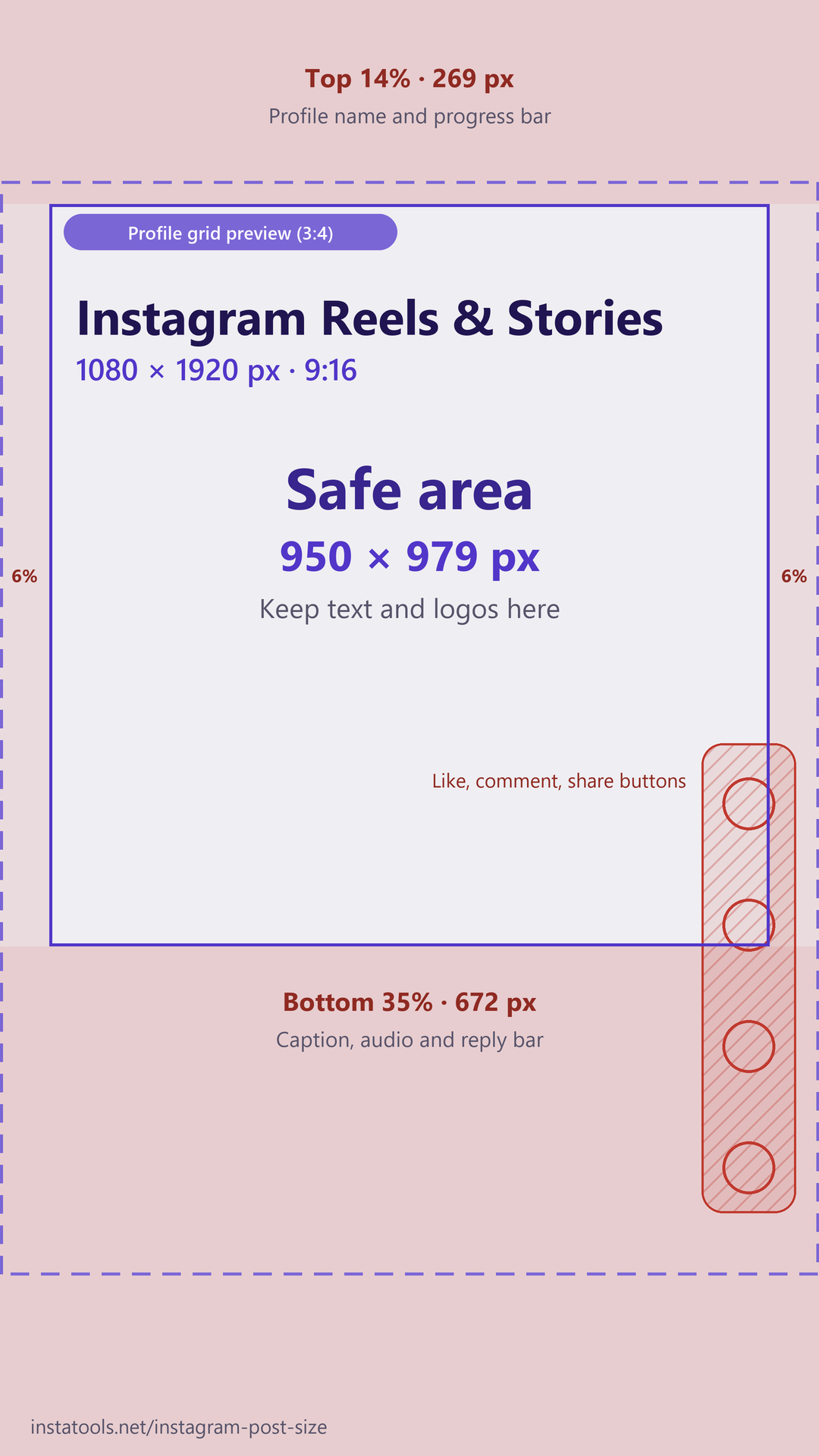
On a 1080 × 1920 px Reel or Story, keep text, logos and key elements out of the top 14% (269 px), the bottom 35% (672 px) and 6% (65 px) on each side. What remains is a safe area of 950 × 979 px. This page has the full breakdown, a free transparent PNG template, and the Reel cover size for the 3:4 profile grid.
The Instagram safe zone in pixels
Instagram draws its own interface over every Reel and Story: your profile name and photo at the top, the caption, audio and reply bar at the bottom, and the like, comment and share buttons at the lower right. Anything you place under those elements can be hidden or hard to read. Meta's current guidance for Reels and Stories gives one set of margins for the 1080 × 1920 frame:
| Area | Share of frame | Pixels on 1080 × 1920 | What covers it |
|---|---|---|---|
| Top margin | 14% | 269 px | Profile name and photo, progress bar (Stories) |
| Bottom margin | 35% | 672 px | Caption, audio label, reply bar (Stories) |
| Each side | 6% | 65 px | Screen edge; the like, comment and share buttons sit at the lower right |
| Safe area | - | 950 × 979 px | Free for text, logos, faces and key elements |
The numbers check out: 1080 − 65 − 65 = 950 px wide, and 1920 − 269 − 672 = 979 px tall. Backgrounds, video and photos can still run edge to edge. The margins only apply to things the viewer must be able to see or read.
Free Instagram safe zone template (PNG)
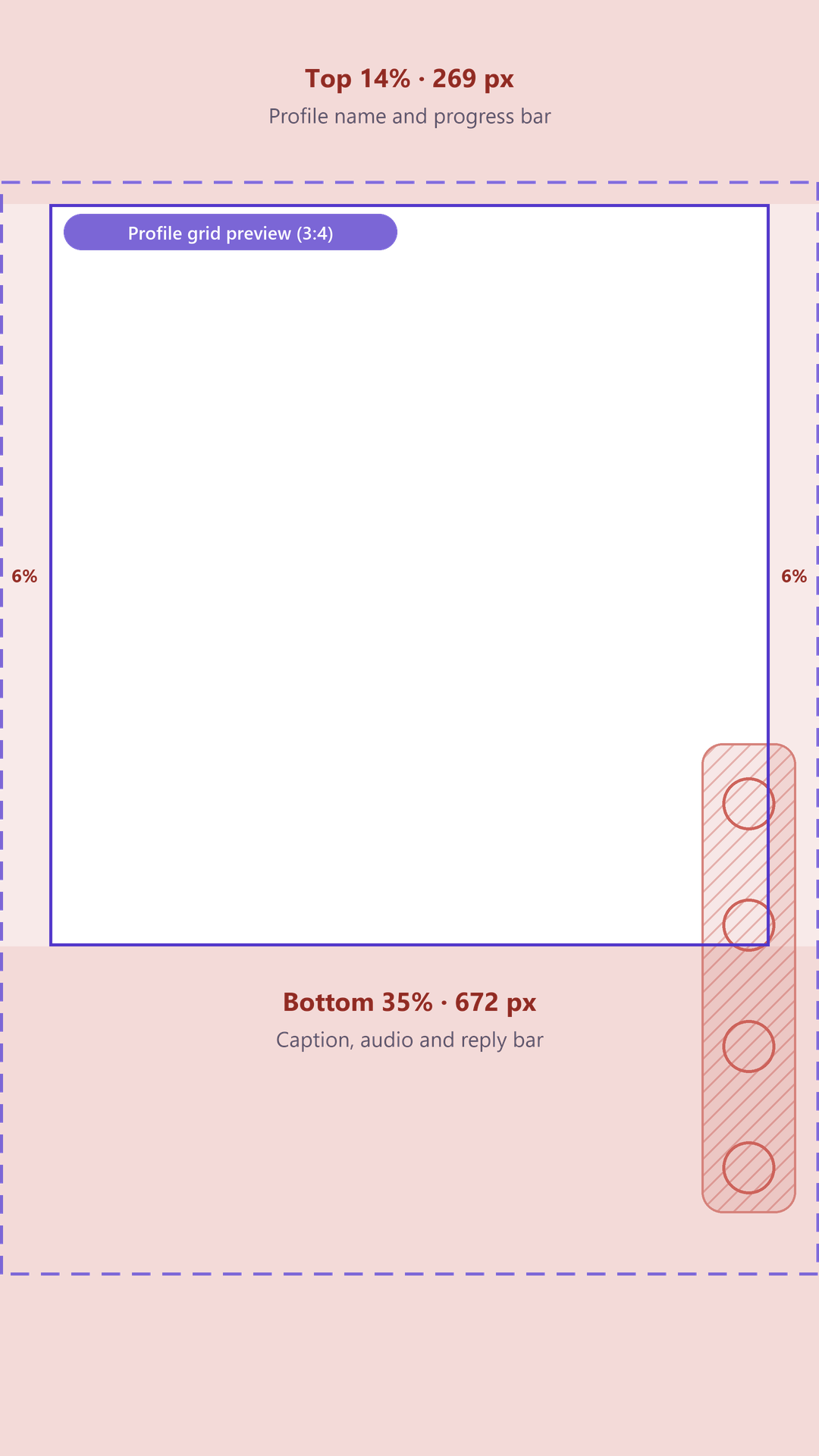
The image below marks all three margins and the safe area on a 1080 × 1920 frame. Below it is a download link for the same guide as a transparent PNG overlay that you can drop on top of your own design. To be clear about what it is: this is a technical template that shows where the zones are, not an editable Canva layout with ready-made designs. If you search for an Instagram story template or Instagram reels template to get pre-built layouts, this overlay is what you use to check them.
Reels vs Stories: is the safe zone different?
For design purposes, no. Both use a 1080 × 1920 px frame at 9:16, and Meta's guidance covers them together, so one template serves both. The interface differs a little: Reels put the like, comment and share buttons at the lower right, while Stories put a reply bar along the bottom. Keep text away from that lower-right corner; designing to the single rule above keeps you clear in either format.
Instagram can change its interface at any time, so treat the pixel values as Meta's guidance rather than a fixed measurement of every phone. If you run ads with a disclaimer, Meta says to leave the bottom 40% (768 px) clear instead.
Want to save a Reel that's already posted? Use download Instagram Reels. This page is about designing new ones.
Reel cover size and the 3:4 profile grid
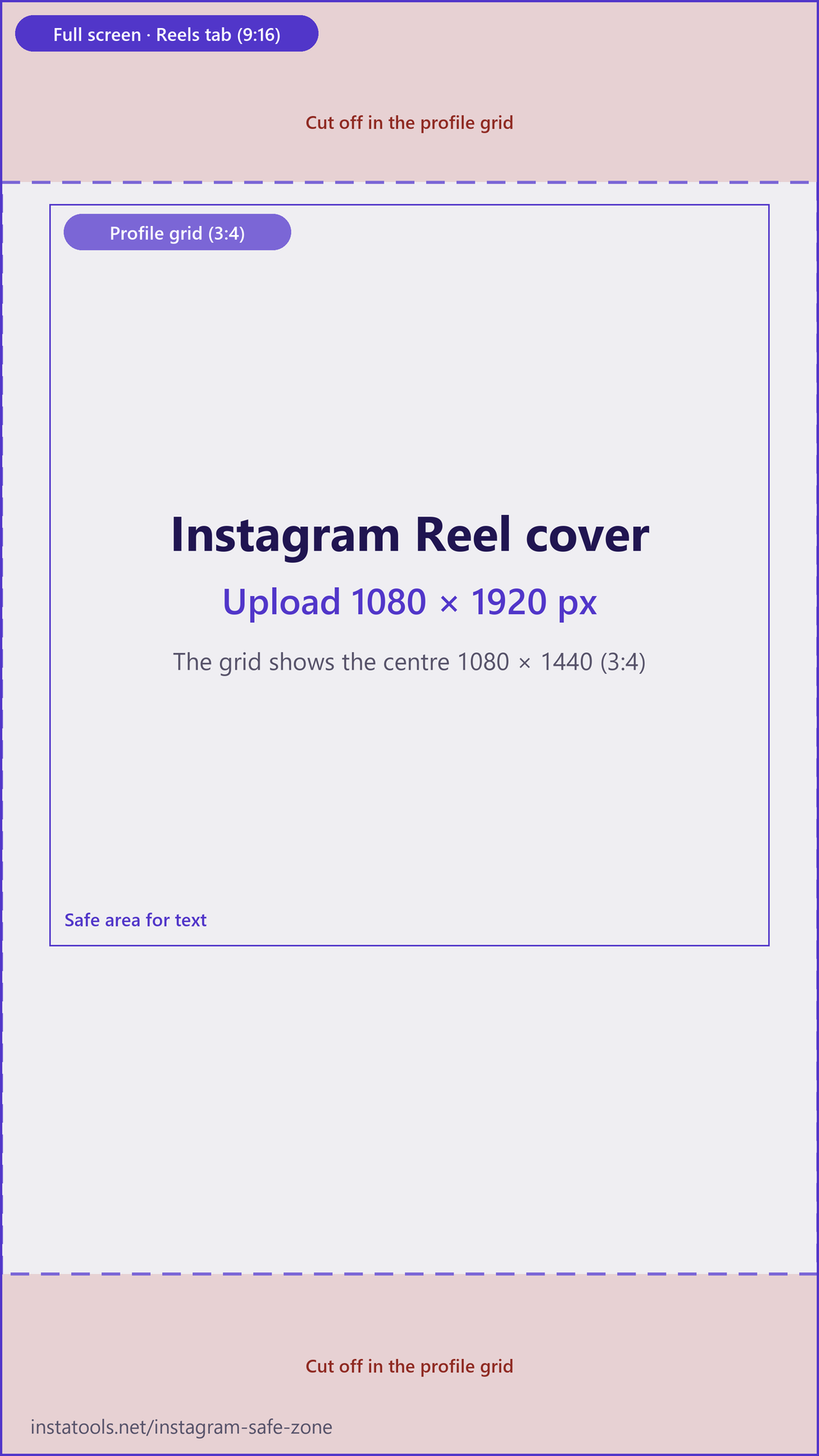
Make your Reel cover 1080 × 1920 px, the same as the Reel itself. On your profile, the grid previews Reels at 3:4, which shows only the centre 1080 × 1440 px of that cover. Instagram cuts 240 px from the top and 240 px from the bottom.
So a cover title has to survive two crops: it must sit inside the centre 3:4 area for the grid, and inside the safe area for the Reel itself. The safe area runs from 269 px down to 1248 px from the top (1920 − 672), which sits fully inside the grid's 240 to 1680 px window. A title that respects the safe zone is therefore also safe in the grid.
Designing a consistent look across your profile? The grid maker splits an image into tiles that line up on the 3:4 grid, and the highlight cover maker does the same job for your Highlight circles.
The old 250 px rule vs the current rule
Many older Stories guides still tell you to keep 250 px free at the top and bottom of the frame. That leaves about 1080 × 1420 px of usable space. Newer guides quote the 14% / 35% / 6% figures, which is why the numbers you find online do not agree.
They are not in conflict. The old rule asked for 250 px at the top and bottom; the current rule asks for 269 px at the top, 672 px at the bottom, and 65 px at each side. Every margin in the current rule is at least as large as its old equivalent, so a design that follows the current rule also satisfies the old one. Design to 14% / 35% / 6% and you can ignore the 250 px figure.
How to check your design against the safe zone
1. Download the overlay: Save the transparent 1080 × 1920 PNG safe zone template from this page.
2. Open a 1080 × 1920 canvas: Create a 1080 × 1920 px (9:16) design in Canva, Figma, Photoshop or any editor, then place the overlay on the top layer.
3. Keep key elements inside the safe area: Move text, logos, faces and calls to action into the 950 × 979 px safe area, away from the marked top, bottom and side zones.
4. Hide the overlay and export: Turn the overlay layer off, export the design as a 1080 × 1920 PNG or JPEG, and upload it as a Reel cover, Story or Reel.
Starting from a photo that is not 9:16? Use the Instagram post size resizer first. Its Story / Reel preset crops or fits your photo to exactly 1080 × 1920 px and has an optional guide that shows roughly where Instagram's interface sits. Nothing is uploaded; it runs in your browser.
Frequently asked questions
- What is the Instagram Story safe zone?
- Meta's current guidance is to keep the top 14% (269 px), the bottom 35% (672 px) and 6% (65 px) on each side of a 1080 × 1920 frame free of text, logos and key elements. That leaves a safe area of 950 × 979 px.
- What is the Instagram Reel safe zone?
- The same as Stories: top 269 px, bottom 672 px and 65 px on each side of a 1080 × 1920 frame. Reels also show like, comment and share buttons at the lower right, so keep text away from that corner.
- What size is an Instagram Reel cover?
- Make the cover 1080 × 1920 px, the same as the Reel. The profile grid previews it at 3:4, which is the centre 1080 × 1440 px of the cover, so keep the title inside that area and inside the safe area.
- What are the Instagram Story dimensions?
- Stories are 1080 × 1920 px at a 9:16 ratio. Reels use the same frame.
- Is the old 250 px safe zone still correct?
- It is the older Stories rule: 250 px free at the top and bottom, about 1080 × 1420 px of usable space. If you design to the current 14% / 35% / 6% rule, you satisfy the old one too.
- Is this a Canva template I can edit?
- No. It is a technical guide: a transparent PNG overlay that you place on top of your own 1080 × 1920 design in Canva, Figma, Photoshop or any editor. It does not include ready-made layouts.